Ace Trace - Shot Tracker
3.2 250.00 Reviews
Analysis By AppCompare
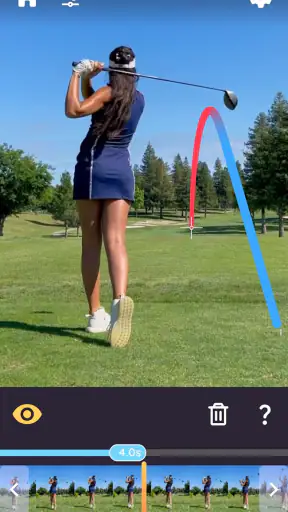
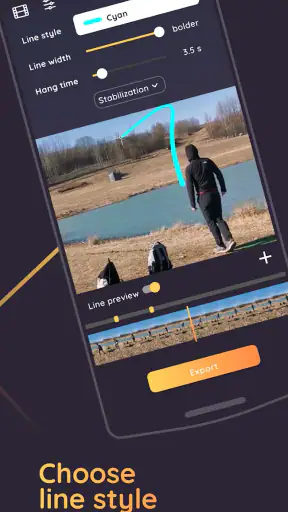
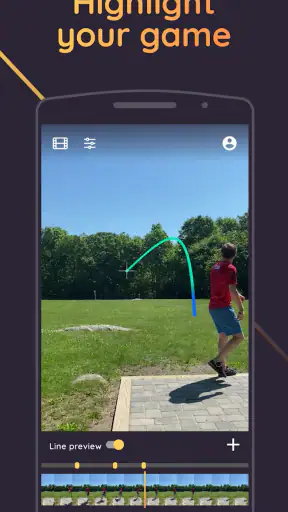
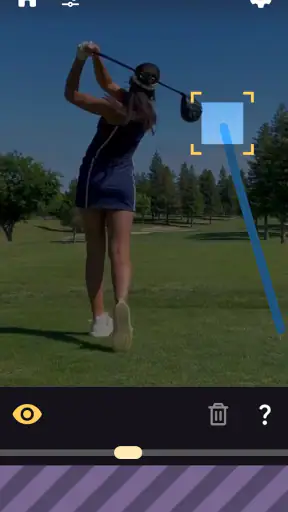
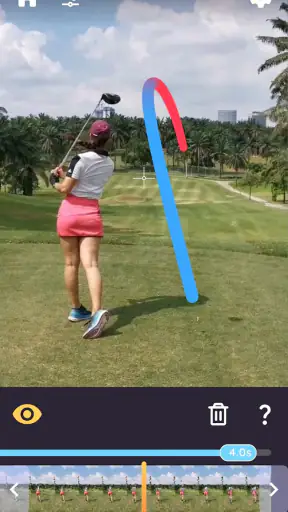
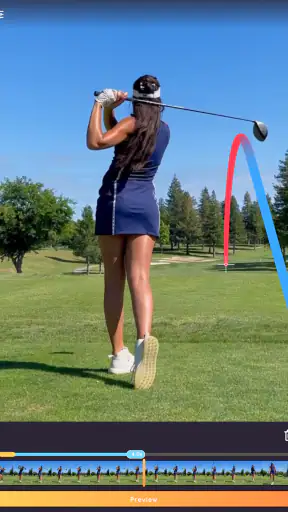
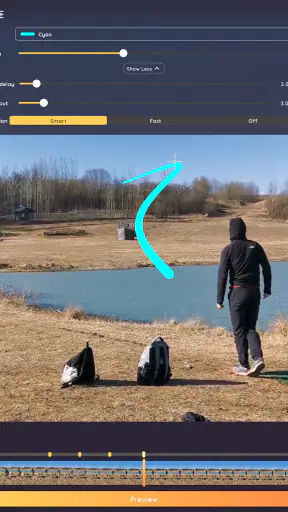
I approached Ace Trace as a practical sports companion rather than a full coaching platform. Its main appeal is simple: it lets you trace the flight of a shot or throw so you can review what happened after the action. That makes it relevant to golfers, disc golfers, baseball players, and people recording other sports activities, but the value depends heavily on how carefully you capture each clip and what you expect the result to tell you.
The app comes from Fitness & Sports apps and sits in the sports category. It is free to install, rated for Everyone, and has passed the point where it feels like an untested experiment: the listing shows over one hundred thousand installs, an average rating of 3.2 from roughly 1.3 thousand ratings, and about 250 written reviews. Those numbers suggest a useful but uneven experience. I would not recommend it blindly to every athlete, yet I can see why someone who wants a quick visual record of a golf shot or baseball hit might keep it on their phone.
How Ace Trace feels when you use it for real sports clips
Speed expectations: quick enough for casual review, not a substitute for analysis equipment
The first thing I noticed about this kind of app is that its usefulness is tied to the gap between recording a moment and understanding it. Ace Trace is designed around visual tracing, so the important question is not whether it can replace a launch monitor or a dedicated coaching setup. It cannot reasonably be treated that way. Its strength is convenience: you already have a phone, you record an attempt, and you use the app to make the path easier to see.
That makes it most attractive after a casual round, practice session, or friendly game. If I wanted to show a playing partner why a golf shot curved, or compare the visible path of two disc throws, a phone-based tracer would be much easier to carry than specialist equipment. The result is also easier to share in conversation because it turns a fleeting movement into something you can inspect again.
There is an important distinction between processing speed and sporting accuracy. A result that appears quickly is not automatically a reliable measurement. The trace is a visual interpretation of recorded footage, so the quality of the original video matters. A clear view of the moving object, a stable camera, and a background that does not swallow the ball or disc all contribute to a more convincing result. When those conditions are poor, the app may feel slow simply because I need to retry the clip or adjust my approach.
For the smoothest workflow, I would prepare the phone before the attempt rather than trying to frame everything at the last second. Put the device somewhere with a broad view, avoid placing the moving object against a similarly colored background, and leave enough surrounding space for the full path. This is a small habit, but it has a bigger effect on the final experience than expecting the app alone to rescue a difficult recording.
The app is therefore fast in the practical sense when the footage is suitable: it reduces the time between an attempt and a visual explanation. It is less suitable when I need instant, instrument-grade feedback about speed, spin, distance, or impact mechanics. For those needs, a dedicated sports sensor, launch monitor, or coaching camera setup remains the better alternative.
Heavy-use moments: where repeated clips become useful and demanding
Ace Trace becomes more interesting when I use it across several attempts instead of treating it as a one-shot novelty. One traced clip can be entertaining, but a small collection can reveal patterns. For example, I might record several golf swings from the same position, compare the visible shape of the shots, and look for a recurring miss. With disc golf, I could use the traces to discuss whether a throw consistently fades early. In baseball, the visual record can help a player and coach talk about the direction of a hit without relying only on memory.
The key is consistency. If every clip is filmed from a different angle, at a different distance, or with a different amount of background clutter, the comparisons become less meaningful. I would treat the phone position as part of the practice routine. Marking a general filming spot, keeping the camera orientation similar, and recording one type of attempt at a time makes the resulting set easier to interpret.
This is one of the app’s less obvious strengths: it can turn casual video into a shared discussion tool. A beginner may not know the technical language for a swing or throw, but a visible path gives both players something concrete to point at. That does not make the trace a diagnosis, yet it can make a lesson more focused. Instead of saying “that one felt wrong,” I can ask whether the visible flight differs from the previous attempt and what changed in the setup.
Heavy use also exposes the practical limits of a phone workflow. Repeated recording means more time spent positioning the device, checking whether the subject stayed visible, and deciding which clips are worth keeping. If I am practicing alone, stopping after every attempt can interrupt rhythm. If I am with friends, the setup may become more effort than the entertainment is worth. I would use the app in short review blocks rather than trying to document an entire session without interruption.
Another useful approach is to record only representative attempts: one ordinary shot, one clear miss, and one result that felt especially good. That gives me a manageable comparison set and avoids filling the phone with nearly identical footage. It also makes recovery easier if a particular clip does not produce a satisfying trace, because the session does not depend on one recording.
Reliability: the recording conditions matter as much as the app
The average rating of 3.2 tells me to keep expectations measured. I read that as a sign that the concept works for some situations but that the experience may not be equally dependable for every user, sport, or clip. A tracer is inherently sensitive to visibility. A small object moving quickly, a busy background, a partially blocked view, or an abrupt camera movement can all make the result harder to trust.
I would not use a traced path as proof of exact ball behavior. It is better understood as a visual aid. That distinction matters if I am making technical decisions about equipment, changing a swing, or trying to settle a disagreement about where a shot traveled. The app can support a conversation, but it should not be the only evidence behind a serious training conclusion.
For golf and disc golf, the best reliability comes from a full view of the flight area and a camera angle that keeps the object visible for as long as possible. For baseball, the challenge can be greater because the ball may move quickly and become difficult to follow. A clip that looks fine to a person watching it may still be challenging for an automated tracing process. I would review the result with the original video in mind rather than assuming every curve or line is equally precise.
There is also a recovery habit worth adopting: keep the original clip until I am satisfied with the traced version. If a result looks strange, the source video helps me decide whether the issue came from the recording or from the interpretation. Deleting the original immediately removes that useful reference. This is especially important when I am building a practice archive or sharing a clip with a coach.
Stability should be judged in context. A short, well-framed clip is a simpler task than a long session with many recordings, and a newer device may handle media work more comfortably than an older one. I would install the app on a phone that has enough free space for the videos I plan to capture and avoid treating it as a background training system that must monitor an entire practice. Its role is closer to focused clip review.
Device constraints: the minimum operating system is only the starting point
The current version is 3.26, and the app requires at least iOS 11. That gives it a relatively broad compatibility range among supported Apple devices, but operating-system compatibility does not guarantee the same camera experience on every phone. Camera quality, available storage, screen size, and general device age can all affect how comfortable the workflow feels.
On a smaller or older phone, framing a distant golf shot may require more care because the subject occupies less of the preview. A device with limited free storage can also make repeated sports recording inconvenient, even though the app itself is free to install. I would check storage before heading to a course or field, especially if I intend to capture many attempts rather than a few examples.
Battery planning is sensible too. Recording video and reviewing clips can be more demanding than ordinary note-taking or scorekeeping. I would begin a practice session with a good charge, reduce unnecessary background activity, and avoid assuming that a phone used for navigation, music, and recording will have unlimited endurance. These are not special requirements unique to the app, but they become noticeable when the phone is doing several jobs at once.
The free entry point is helpful for trying the workflow without committing immediately. At the same time, in-app purchases range from $0.99 to $69.99 per item, so I would inspect what is included before paying for anything. The wide range means the total cost can depend on which optional items I choose and how deeply I use the app. For a person who only wants occasional traces, the free starting point may be enough to judge whether the concept fits. Someone planning regular use should make that decision after testing the basic experience, not from the store summary alone.
Age access is straightforward because the app is rated Everyone. That makes it suitable for a family sports setting from an age-rating perspective, although younger players may still need help positioning the phone safely. I would never place a device where a club, ball, or disc could strike it simply to improve the camera angle. A slightly less perfect recording is preferable to risking the phone.
Where it fits among the usual sports alternatives
The most obvious alternative is ordinary phone video. Standard recording is simpler and preserves the scene exactly as it happened, which is valuable when I want to inspect body position, contact, or the surroundings. Ace Trace adds a layer of interpretation that can make the flight easier to discuss, but that extra layer also introduces uncertainty. If my priority is preserving evidence, regular video may be better. If my priority is quickly showing the path, the tracer has a clearer advantage.
Another alternative is a dedicated golf or baseball analysis system. Those tools may offer more specialized measurements and repeatable feedback, but they usually demand more equipment, more setup, and a larger commitment. Ace Trace makes more sense for recreational players, beginners, and athletes who want a visual aid without building a complete practice station.
It also differs from a scorekeeping app. A scorecard helps me track outcomes, while this app focuses on showing movement. I would not expect it to replace a scoring routine, club-distance record, or structured training log. In fact, the strongest setup may use the tracer alongside a simple written note: record the attempt, save the useful visual, and write down what I felt or changed. The trace then becomes part of a broader practice record instead of being asked to explain everything by itself.
For a coach, the app may be useful as a conversation starter during informal sessions. For a serious athlete who needs repeatable measurements, it is probably too limited as the only tool. That is not a failure; it is a question of fit. A lightweight visual aid and a technical measurement system serve different purposes.
Everyday scenarios where the app earns its place
Imagine I am at a driving range with a friend. I set the phone behind and to the side, leave enough space in the frame, and record a few shots rather than every swing. Afterward, we review the one that curved unexpectedly and compare it with a straighter attempt. The trace gives us a common visual reference, while the original footage lets us check whether the interpretation matches what we can see. That is a realistic, low-pressure use case where convenience matters more than laboratory precision.
For disc golf, I might record a drive from the tee and use the result to discuss the flight shape with someone who has more experience. The app can make the path easier for a beginner to describe, especially when the disc disappears visually against trees or distant terrain. I would still verify the broad direction with the actual course and not use the trace to make exact claims about distance or disc behavior.
For baseball, a player could save a few clips from batting practice and use them to compare the direction of hits. The useful question is not “did the app calculate every detail?” but “does this clip help us talk about the difference between attempts?” If the answer is yes, the app has done its job. If the player needs precise exit data or a complete swing breakdown, a more specialized system is the sensible choice.
Another scenario is sharing a result with a friend who was not present. A normal video may show the swing but make the ball’s flight easy to miss. A visual trace can communicate the outcome faster. That social value is easy to overlook, but it is one reason a simple sports utility can remain useful even when it is not a professional analysis tool.
Who should use it, and who should skip it?
I would recommend trying Ace Trace if you enjoy recording sports clips, want a clearer way to discuss flight paths, or are looking for a low-commitment practice aid. It is particularly well suited to recreational golfers, disc golfers, baseball players, and friends who want to review attempts together. The free installation also makes experimentation less risky, provided I remain aware of the optional purchase range.
I would be more cautious if I were buying it for exact performance measurement. The app’s purpose is visual tracing, not a guarantee of professional-grade numbers. Players working with a coach may find it helpful as an additional view, but I would not replace expert observation or dedicated equipment with it. Likewise, anyone who dislikes stopping to position a phone may find the workflow more cumbersome than expected.
People using older devices should test a short clip before planning a full session. The operating-system requirement is clear, but practical comfort depends on the phone’s camera, storage, battery condition, and screen. If the device struggles with recording or if the sports environment makes the object hard to see, the app may not deliver enough value to justify the effort.
My performance verdict after weighing speed, load, and recovery
My overall view is that Ace Trace is a focused visual tool with a sensible place in casual and intermediate sports practice. It feels most effective when I prepare the shot carefully, record a short clip, and use the result to compare or explain what happened. It is less convincing when I expect automatic tracing to overcome poor framing, fast motion, or a cluttered background.
The app’s main performance advantage is not raw speed; it is the reduced effort compared with specialized sports hardware. Its main weakness is that the same convenience makes the result dependent on phone placement and video quality. Heavy use can also become tiring because every useful attempt requires some attention to setup, storage, and review. Keeping the original footage and working with a small set of representative clips makes the experience more dependable.
With version 3.26, a minimum requirement of iOS 11, and a free starting point, it is easy enough to test on a compatible device. I would begin with a few controlled recordings before considering any in-app purchase. If the traces consistently help me see and discuss shots, the app has earned a place in my sports toolkit. If I need exact measurements, uninterrupted practice, or specialist coaching data, I would choose ordinary video or dedicated equipment instead.
My recommendation is conditional but positive: try it for visual feedback and shared sports review, not as a definitive judge of technique. Used with realistic expectations, Ace Trace can turn an easily forgotten shot into a useful conversation and a repeatable practice reference. That is a modest goal, but for a free sports app, it is a worthwhile one.
FAQ
What is Ace Trace - Shot Tracker used for?
Ace Trace - Shot Tracker is designed to help golfers review and understand their shots by using video analysis and tracking tools. It can help identify ball flight, shot direction, distance, and other useful details, making it easier to evaluate practice sessions and recognize areas that need improvement. It is mainly intended as a training and performance-review companion rather than a replacement for professional coaching.
How does Ace Trace track a golf shot?
The app generally relies on a recorded golf video and computer-vision analysis to follow the ball after impact. For the best results, the camera should have a clear view of the golfer and the ball flight, with good lighting and minimal obstruction. Accuracy may vary depending on video quality, camera position, background conditions, and how easily the ball can be seen during its flight.
Does Ace Trace - Shot Tracker work with any golf course or practice session?
Ace Trace can be useful both on the course and during practice, but the available information and tracking quality may depend on the session and recording conditions. Some features may work best when course details, shot locations, or compatible data are available. Before downloading, golfers should check the current app listing for supported devices, course coverage, and whether certain tools require an active subscription.
Is Ace Trace - Shot Tracker free to download and use?
The app may be available to download without an upfront charge, but some advanced analysis tools, tracking features, or premium content can require in-app purchases or a subscription. Pricing and included functionality may change over time, so it is worth reviewing the latest store description before installing. Users should also check whether a trial automatically renews unless canceled through their Apple or Google account.
What should I know about privacy and device requirements before installing it?
Because Ace Trace is built around golf videos, location-related information, or performance data, it may request access to the camera, photo library, storage, and possibly location services. These permissions are useful for recording and analyzing shots, but users should review the app’s privacy policy and store disclosures first. A modern device, sufficient storage, and a stable internet connection may also be needed for processing or syncing data.
Pros
- Automatic shot tracking helps review performance without manual note-taking.
- Clear visual shot maps make strengths and weak areas easy to identify.
- Useful for comparing rounds and spotting consistency trends over time.
- Simple interface lets golfers start tracking with minimal setup.
- Helpful training companion for players working on course strategy.
Cons
- Tracking accuracy may vary depending on phone placement and camera visibility.
- Some advanced analysis features may require a paid subscription.
- Recording a full round can consume noticeable battery and storage.
- The app may be less useful on courses with poor GPS or mobile reception.
- Reviewing detailed data can take time for casual golfers.